

Generative AI has a problem. Large Language Models (LLMs) like Gemini are incredibly powerful “thinkers” but they are often isolated. They are like a genius locked in a room with no internet access - they can write poetry and solve math problems, but they can’t check the live weather, query your database, or book a meeting.
How do we give them hands to interact with the real world?
Enter the Model Context Protocol (MCP) and Google ADK.
In this guide, we are going to build a production-ready AI Agent using the Google Agent Development Kit (ADK) and Gemini 3. But we won’t just run it locally. We are going to deploy our tools as a scalable, secure MCP Server on Google Cloud Run.
If you are comfortable with containers but new to Serverless or AI integration, you are in the right place. Let’s build a “Serverless Brain”.
The Architecture
Before we write code, let’s visualize what we are building. We are moving away from monolithic AI apps to a modular design.
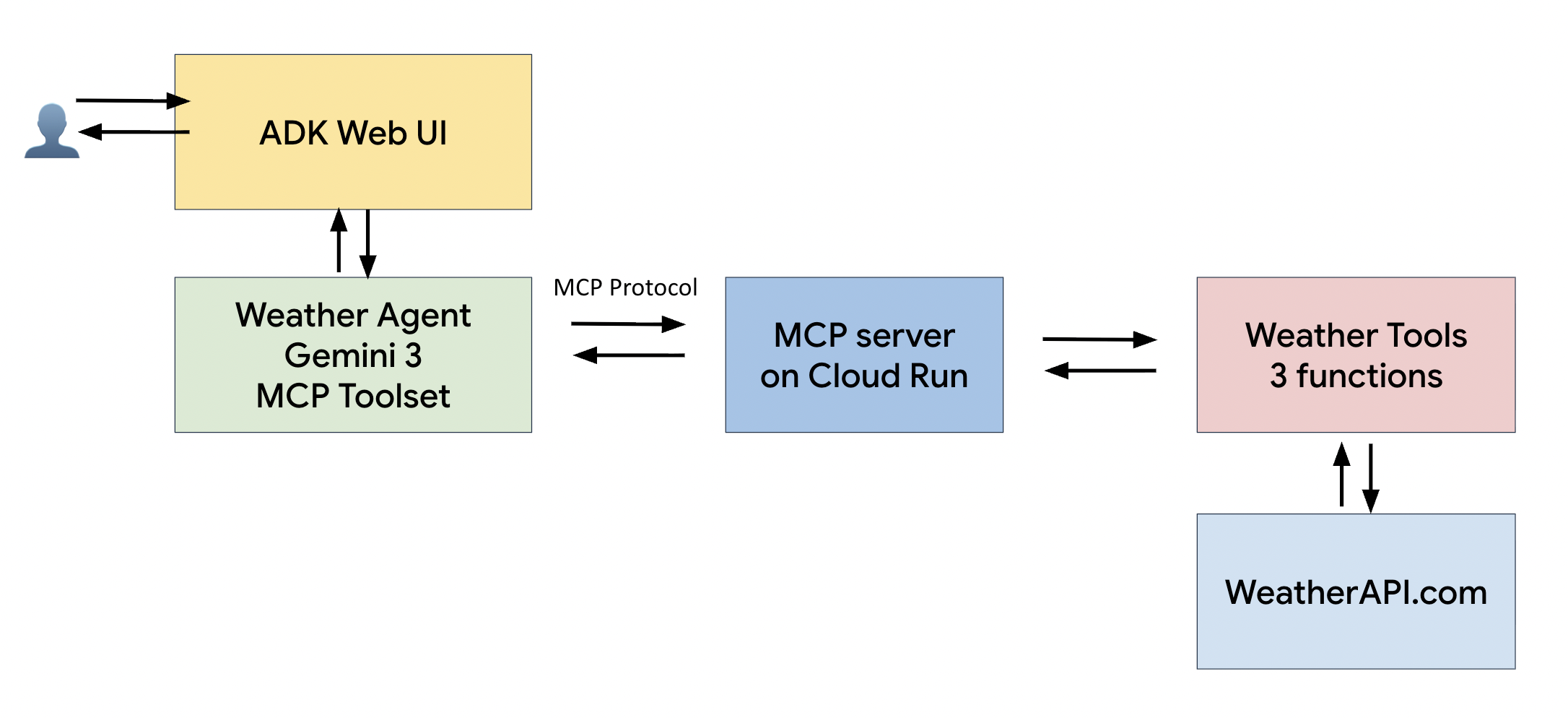
- The User: Interacts with a web interface.
- The Agent (Client): Built with Google ADK. It acts as the orchestrator.
- The Model: Gemini 3 (or 2.5 Flash). It decides which tool to use.
- The Tools (Server): Hosted on Cloud Run. These are the actual functions (e.g., getting weather data) that the AI calls via the MCP protocol.
Why this matters?
- Scalability: Cloud Run is serverless. It scales to zero when not in use (saving you money) and scales up instantly when traffic spikes.
- Security: Your API keys (like WeatherAPI) stay on the server side in Google Secret Manager, never leaking to the client.
- Reusability: One MCP server can serve multiple agents or users.
Prerequisites
- Google Cloud console (for Cloud Run)
- Google AI Studio (for Gemini API Key)
- WeatherAPI.com ( for weather API Key, free tier is fine)
- Python 3.12+ and
uv(modern Python package manager)
Before we begin, clone the source code from this repository to follow along.
git clone https://github.com/truongnh1992/mcp-on-cloudrun.git
Part 1: Building the MCP Server (The Tools)
Let’s start by building the backend MCP server. We’ll use fastmcp to define our tools and wrap them in an application, which allows us to expose the tools via HTTP endpoints that can be accessed remotely over the internet.
1. Define the Tools (weather.py)
First, we define our weather capabilities using the @mcp.tool() decorator.
from mcp.server.fastmcp import FastMCP
import httpx

mcp = FastMCP("weather")

@mcp.tool()
async def get_current_weather(city: str) -> str:
    """Get current weather conditions for a city."""
    # ... (implementation calling WeatherAPI) ...
    return f"The weather in {city} is {temp}°C and {condition}."

@mcp.tool()
async def get_forecast(city: str, days: int = 3) -> str:
    """Get weather forecast for a city."""
    # ... (implementation) ...
2. Create the HTTP Handler
To make this accessible remotely, we implement a JSON-RPC 2.0 handler. This allows our agent to send tools/call requests via standard HTTPS POST.
# mcp-server/weather.py

async def mcp_handler(request):
    data = await request.json()
    method = data.get("method")

    if method == "tools/call":
        result = await handle_tool_call(data) # Execute the tool
        return JSONResponse(result)

    # Handle 'initialize' and 'tools/list' similarly...

app = Starlette(
    routes=[
        Route('/', mcp_handler, methods=['POST']),
        Route('/sse', mcp_handler, methods=['POST']),
    ]
)
3. Deploy to Google Cloud Run
We containerize our server with Docker and deploy it. Using Cloud Run means we don’t pay for a server when no one is asking about the weather!
# mcp-server/deploy.sh
gcloud run deploy weather-mcp-server \
    --source . \
    --region asia-southeast1 \
    --allow-unauthenticated \
    --set-secrets WEATHERAPI_KEY=weatherapi-key:latest
What just happened?
- Google Cloud built a container from your source code.
- It deployed it to a secure HTTPS endpoint.
- It injected your API key securely from Secret Manager.
- You received a URL looking like: https://weather-mcp-server-xyz.run.app
Part 2: Building the AI Agent with Google ADK
Now that our “hands” (the server) are live, let’s build the “brain” using the Google Agent Development Kit (ADK). This provides a professional web interface and easy integration with Gemini.
1. Connect to the Remote Server
Instead of importing python functions directly, we configure the ADK agent to talk to our Cloud Run URL.
# mcp-client/weather_agent/agent.py

from google.adk import Agent
from google.adk.tools.mcp_tool.mcp_toolset import McpToolset, StreamableHTTPConnectionParams

# 1. Point to your Cloud Run URL
MCP_SERVER_URL = "https://weather-mcp-server-xyz.run.app"

# 2. Configure the connection (HTTP over JSON-RPC)
connection_params = StreamableHTTPConnectionParams(
    url=MCP_SERVER_URL,
    timeout=30.0, # Increased timeout to allow for Cloud Run "cold starts"
)

weather_tools = McpToolset(connection_params=connection_params)

# 3. Create the Agent using Gemini
root_agent = Agent(
    name="weather_agent",
    model="gemini-3-pro-preview", # Or gemini-2.5-flash
    tools=[weather_tools],
)
2. Run the Agent
With uv, starting the agent is a breeze:
cd mcp-client
uv run adk web
This launches the ADK interface at http://localhost:8000.
Seeing it in Action
- Open your browser to
http://localhost:8000. - Select weather_agent.
- Ask: “What’s the weather like in Hanoi right now?”
What happens behind the scenes:
1> Gemini analyzes your request and decides to call get_current_weather("Hanoi").
2> ADK sends a HTTP request to your Cloud Run endpoint.
3> Your server on Cloud Run wakes up, calls WeatherAPI, and returns the data.
4> Gemini receives the raw data (Temp: 18°C, Humidity: 45%) and answers you naturally: “It’s currently a pleasant 18°C in Hanoi with clear skies…”
There are four key players here: the User, our Agent (which acts as the MCP Client), the Model (the ‘brain’, in this case, Gemini), and the Tools (exposed via an MCP Server).
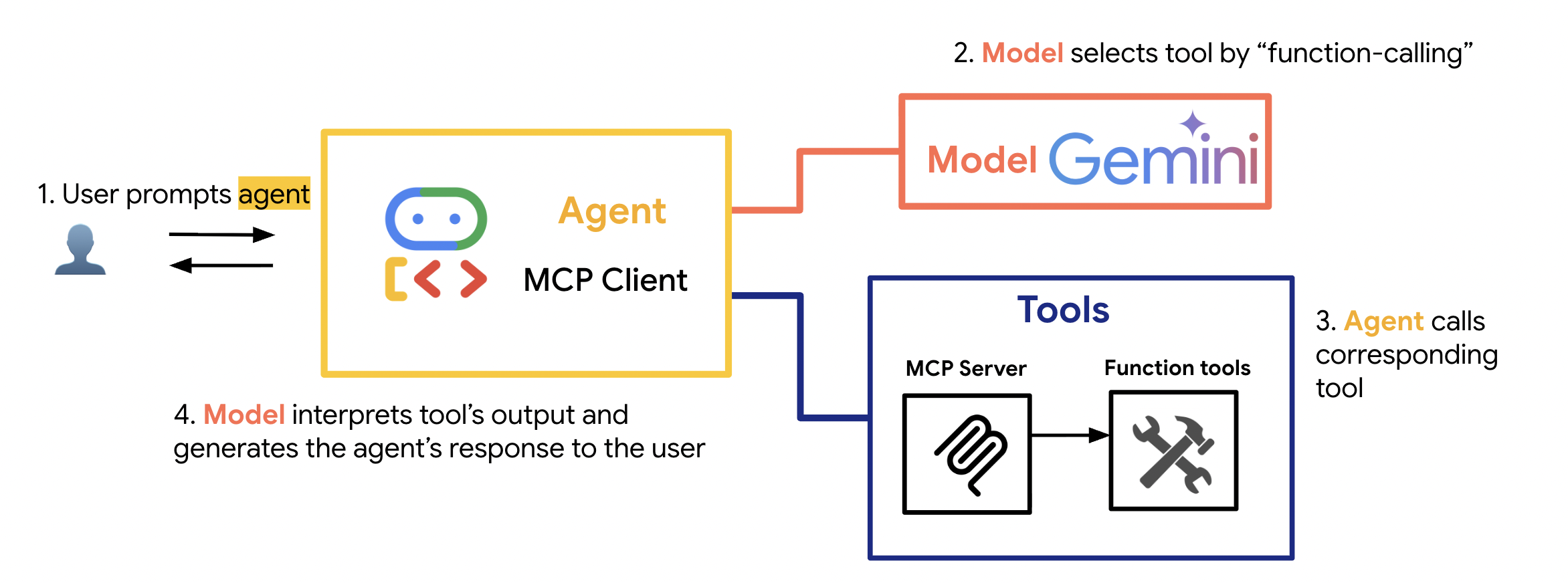
The process happens in four steps:
- Step 1: The User prompts the agent. This is the starting point. The user asks a question or gives a command that requires external information, like “What’s the weather in Hanoi?”
- Step 2: The Agent sends this prompt to the Model. The agent itself doesn’t know What’s the weather in Hanoi?; its job is to orchestrate. It sends the user’s request, along with a list of available tools, to the Gemini model. The model then uses its reasoning and function-calling capabilities to determine which tool is needed and what parameters to use. For example, it would decide: “I need the
get_current_weathertool withcity: Hanoi.” It then sends this structured command back to the agent. - Step 3: The Agent calls the corresponding tool. Now that the agent has its instructions from the model, it acts. As an MCP Client, it makes a standardized call to the MCP Server that hosts the
get_current_weatherfunction. It executes the call. - Step 4: The Model interprets the output. The tool does its job and returns raw data. This isn’t a very human-friendly response. So, the agent sends this data back to the Gemini model one last time. The model’s final job is to interpret that raw data and generate a natural, conversational response for the user.
So, to summarize: The Model is the thinker, the Agent is the doer, and MCP is the standard protocol that allows them to communicate with the tools reliably
Key Takeaways
- Remote MCP is powerful: You can build a library of shared tools hosted on the cloud, accessible by any agent with the right credentials.
- Google ADK simplifies UI: You don’t need to build a frontend from scratch; ADK provides a chat interface with streaming support out of the box.
- Cloud Run is perfect for tools: Serverless is the ideal home for sporadic tool usage-efficient, cost-effective, and scalable.
- Gemini is the Orchestrator: With models like Gemini 2.5 Flash or Gemini 3, the reasoning capabilities are fast enough to select tools in real-time.
Happy coding! 🚀